Simplify Your Math Calculations with the Math Expressions Calculator Chrome Extension

Do you often find yourself struggling with complex mathematical calculations? Are you looking for a quick and easy way to simplify your calculations while working on your Chrome browser? If yes, then the Math Expressions Calculator Chrome Extension is the solution to all your problems.
The Math Expressions Calculator Chrome Extension is a tool designed to help you solve complex mathematical expressions quickly and easily. It is a simple and efficient way to save time and reduce errors in your calculations.
In this blog post, we will explore the features and benefits of this Chrome extension to help you understand how it can simplify your math calculations.
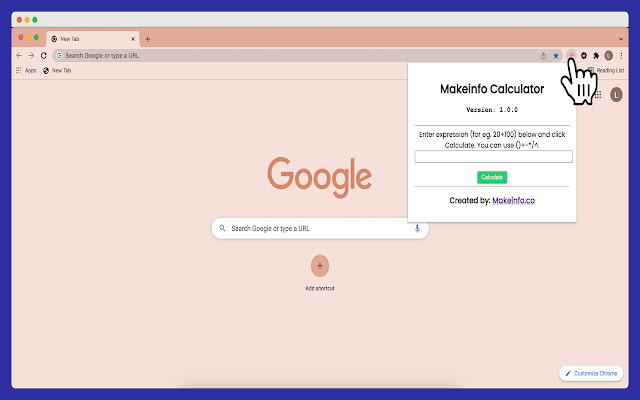
What Does It Do? How It Differs?
Using Makeinfo Calculator, you can do most of the arithmetic operations, including:
Addition
Subtraction
Division
Multiplication
For example, you can write expressions like this (2+3)*10 for calculation.
The main difference from other calculators is mainly in the math expression and the below image.

How to Install the Math Expressions Calculator Chrome Extension
To install the Math Expressions Calculator Chrome Extension, follow these simple steps:
Open the Chrome browser on your computer.
Go to the Chrome Web Store.
Search for "Makeinfo Calculator."
Click on the "Add to Chrome" button.
A pop-up will appear, asking for confirmation. Click on the "Add Extension" button.
The chrome extension will be added to your browser.
How To Use Makeinfo Calculator?
After you install the Makeinfo Calculator from the Chrome Store, you will get the calculator dialog box to do the BODMAS operations. You can use ()+/*^ for doing the mathematical expressions.
Using the Math Expressions Calculator Chrome Extension is simple and straightforward. Follow these steps to use the tool:
Open the webpage where you want to perform calculations.
Click on the Math Expressions Calculator Chrome Extension icon on the toolbar.
The calculator will appear on the screen.
Enter the mathematical expression you want to solve.
Click on the "Calculate" button.
The answer will be displayed on the screen.
Please share this post if you think it's going to help someone.
Let's connect,
Comments
Join the discussionNo comments yet. Be the first to comment.
